
O3DE UI Spinbox Component
Use a spinbox as a number edit component to enable users to use a variety of controls to “spin” up or down a numeric value in an input box. The value is changed by the amount specified in the step value.
Use the SpinBox class for signed integer values, and the DoubleSpinBox class to hold double values.
Note:In scenarios where you would use the spinbox, also consider using the slider combo widget, which combines the extra visual cues of a slider with the ease of adjustment of a spinbox.
Anatomy of the spinbox widget
Spinboxes provide the user with a variety of controls for entering or changing their numerical value.
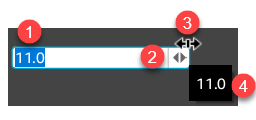
Input box value
The current value in the input box area is editable.
Increment and decrement buttons
Users click on the increment or decrement button to adjust the numeric value by the step amount.
Spin control
The spin control appears when a pointer is near the edge of the input box. This is a faster way for the user to adjust the current value by the step amount. The user continuously changes the value as they move in the direction of one of the arrows while pressing the mouse button.
Current value indicator
The current value appears in this dialog box when a user hovers over the component for 1 second. Unlike the display of the value in the input box edit region, the value displayed here will not be truncated.
Basic spinbox

The following example demonstrates the creation of a simple, double spinbox.
Example
#include <AzQtComponents/Components/Widgets/SpinBox.h>

// Create a new double spinbox widget.
AzQtComponents::DoubleSpinBox* doubleSpinBox = new AzQtComponents::DoubleSpinBox(parent);

// Set its range from 0.0 to 20.0 and its initial value to 15.0.
doubleSpinBox->setRange(0.0, 20.0);
doubleSpinBox->setValue(15.0);

// Set the step value to 0.1.
doubleSpinBox->setSingleStep(0.1);
C++ API reference
For details on the spinbox API’s, see the following topics in the O3DE UI Extensions C++ API Reference:
Relevant Qt documentation includes the following topics: