
UI Canvas Proxy Ref Component
With the UI Canvas Proxy Ref component, you can reference a UI canvas that a different entity manages. Use this component in conjunction with the UI Canvas on Mesh component if you want to place a UI canvas on a Mesh or Actor component that a player can interact with in multple places in a level.
Usage
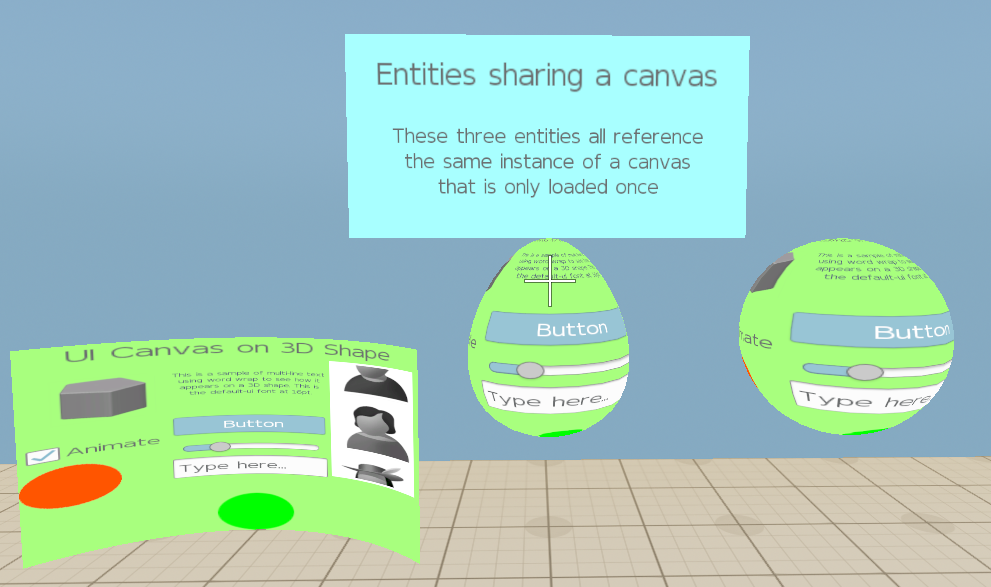
Use of this component is often a special case, as it supports displaying the same UI canvas on multiple entities in the 3D world. The UI Canvas Proxy Ref component allows the entity that it is on to act as if it had a UI Canvas Asset Ref component but without having to load another copy of the UI canvas. This means that, as the user interacts with one UI canvas on a 3D object, the other 3D object shows the same changes.
The following picture shows three entities that share the same loaded canvas. The curved plane entity has a UI Canvas Asset Ref component and the egg and the sphere both have UI Canvas Proxy Ref components:
For more information, refer to Placing UI Canvases in the 3D World.
Provider
UI Canvas Proxy Ref properties

| Property | Description | Values | Default |
|---|---|---|---|
| Canvas Asset Ref entity | Selects an entity with a UI Canvas Asset Ref component. | EntityId | None |
UiCanvasProxyRefBus
| Method Name | Description | Parameter | Return | Scriptable |
|---|---|---|---|---|
SetCanvasRefEntity | Sets a target entity with a UI canvas to associate with the current entity. | Target Entity: EntityId, Current Entity: EntityId | None | Yes |
UiCanvasRefNotificationBus
| Method Name | Description | Parameter | Return | Scriptable |
|---|---|---|---|---|
OnCanvasRefChanged | Notifies listeners that the canvas reference has changed. | None | Old Reference: EntityId, New Reference: EntityId | Yes |
For more information, see Working with the Event Bus (EBus) system.