
AWS Metrics Scripting
With the AWS Metrics Gem set up, clients can generate and submit metrics events using Script Canvas, Lua, or C++. The following examples demonstrate using Script Canvas and Lua to script behavior. Refer to Using the C++ API with the AWS Metrics Gem for C++ examples.
Script Canvas
Example: Submitting a metrics event
The following image shows how to submit a metrics event and listen to the success or failure notification with the AWS Metrics nodes.
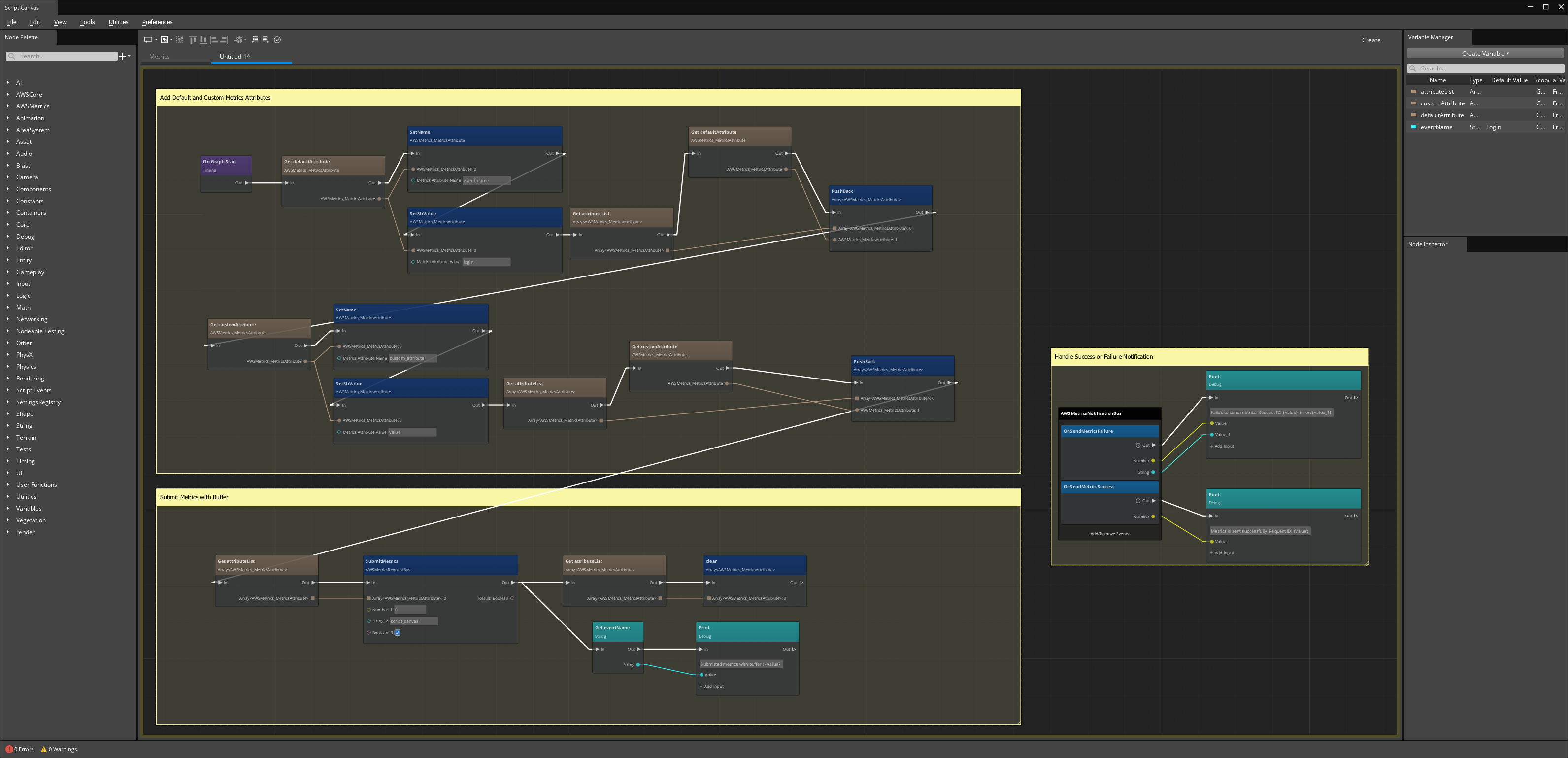
To do:Break this image into smaller pieces and describe each one.
A tracking issue has been created for this task here .
Lua
The following script provides a simple example of calling the AWS Metrics API using Lua.
-- Create a new metrics attribute.
attribute = AWSMetrics_MetricsAttribute()

-- Set the name of the metrics attribute.
attribute:SetName("attribute_name")

-- Set the value of the metrics attribute.
-- You can set string, integer, or double as the attribute value.
-- Call SetStrValue, SetIntValue, or SetDoubleValue for the corresponding value type.
attribute:SetStrValue("attribute_value")

-- Add the attribute to the metrics attribute list.
attributeList = AWSMetrics_AttributesSubmissionList()
attributeList.attributes:push_back(attribute)

-- Generate a new metrics event using the metrics attribute list and submit it.
AWSMetricsRequestBus.Broadcast.SubmitMetrics(attributeList.attributes, "event_source", true)

-- Flush the buffer and send all the metrics.
AWSMetricsRequestBus.Broadcast.FlushMetrics()
You can also add multiple metrics attributes to an event. Custom metrics attributes not included in the
event JSON schema are added to the event_data field as a flat JSON dictionary.
Note:The metrics event is validated against a JSON schema before submission. The event is dropped if any of the required attributes are missing, or if the attribute value doesn’t match the expected pattern.
Capturing notifications
To capture notifications in Lua, connect to the AWSMetricsNotificationBus bus during activation, and disconnect from it during deactivation, as shown in the following example.
function sample:OnActivate()
    -- Connect to the AWSMetricsNotificationBus bus.
    self.metricsNotificationHandler = AWSMetricsNotificationBus.Connect(self, self.entityId)
end

function sample:OnSendMetricsSuccess(requestId)
    -- Do something after metrics events send successfully.
end

function sample:OnSendMetricsFailure(requestId, errorMessage)
    -- Do something when metrics events fail to send.
end

function sample:OnDeactivate()
    -- Disconnect from the AWSMetricsNotificationBus bus.
    self.metricsNotificationHandler:Disconnect()
end