
Audio Engine Middleware Controls Pane

Wwise is shown here as an example of an audio engine middleware’s controls pane.

To filter displayed controls

  • In the Audio Controls Editor, in the audio engine middleware controls pane, enter your search term into the Search bar.

To hide controls that are already assigned

  • Select Hide Assigned. The unassigned controls appear in orange text.

To create connections between ATL controls and middleware-specific controls

  • In the audio engine middleware controls pane, select and drag a control to the Connected Controls area of the Inspector pane.
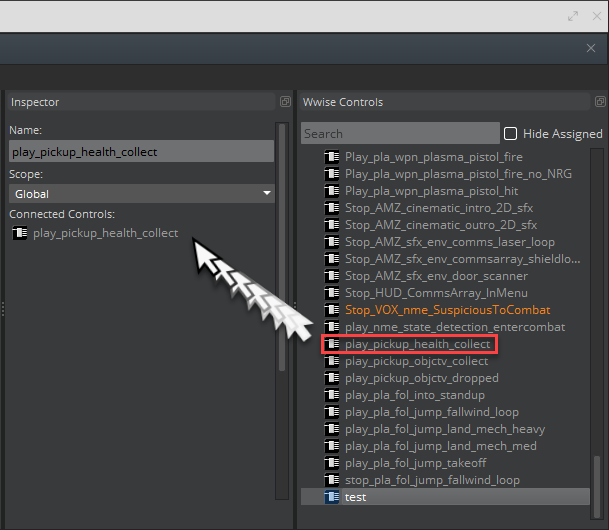
Drag the selected control to the Connected Controls area of the Inspector pane

To create a control

  1. In the audio engine middleware controls pane, select and drag a control to the ATL Controls pane.
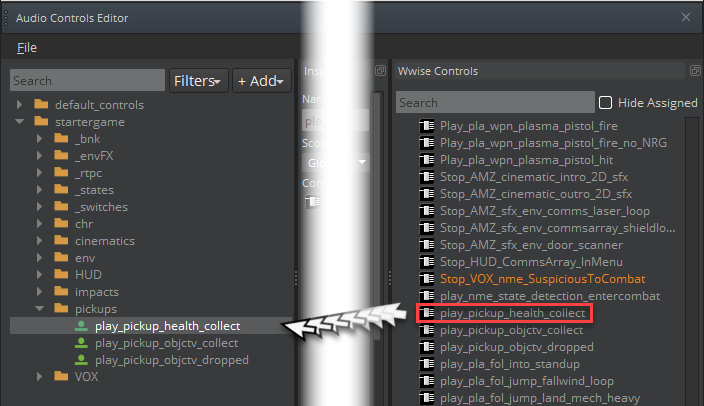
Drag a middleware control directly into the ATL Controls pane to create a new control.

This creates a new control, which shares the same name of the middleware control. The middleware control and the ATL control are also automatically connected.

  1. To preview the control, choose File, Save All.

Copyright © 2026 DawnEngine. All rights reserved.

DawnEngine is a commercial 3D engine distributed under the DawnEngine end-user license agreement. Engine binaries and source are proprietary and are not covered by the licenses below.

Documentation only: the prose and templates on this site are a derivative work of Open 3D Engine (O3DE) documentation by the O3DE Contributors, used under CC BY 4.0 (documentation content), Apache 2.0 (site code), and the MIT license (inline code samples).

The open-source 3D engine that DawnEngine is built on top of is Open 3D Engine . DawnEngine is not affiliated with, endorsed by, or sponsored by The Linux Foundation or the O3DE project. “O3DE” and “Open 3D Engine” are trademarks of The Linux Foundation.