
Referencing Entities

Nodes can contain an entity property. These properties tell the node which entity to affect. By default, many nodes reference Self, the entity that contains the Script Canvas component that specifies the script that contains the node. Alternatively, you can reference a different entity other than Self.

Referencing entities from a node

  1. From the Node Palette, locate the node that you want to add to your script and drag it to the canvas.

  2. In the node, position your pointer over the entity property and then click the target icon.
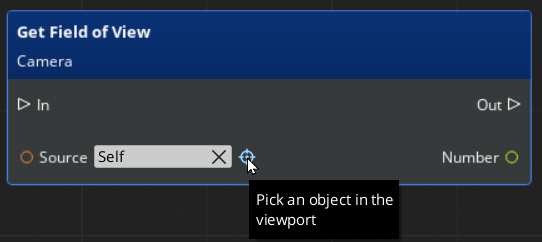
    Select and deselect entities for nodes in the Script Canvas Editor.

  3. In the O3DE Editor viewport or the Entity Outliner, select the entity that you want to reference.

  4. To clear the entity, position your pointer over the entity property and then click the x icon.

  5. To reset a property back to self, right-click the entity property and choose Reset Value.


Copyright © 2026 DawnEngine. All rights reserved.

DawnEngine is a commercial 3D engine distributed under the DawnEngine end-user license agreement. Engine binaries and source are proprietary and are not covered by the licenses below.

Documentation only: the prose and templates on this site are a derivative work of Open 3D Engine (O3DE) documentation by the O3DE Contributors, used under CC BY 4.0 (documentation content), Apache 2.0 (site code), and the MIT license (inline code samples).

The open-source 3D engine that DawnEngine is built on top of is Open 3D Engine . DawnEngine is not affiliated with, endorsed by, or sponsored by The Linux Foundation or the O3DE project. “O3DE” and “Open 3D Engine” are trademarks of The Linux Foundation.