
Add Cloth Colliders to actors
Applying cloth simulation to actors adds realism and dynamism in their every movement. Adding cloth colliders greatly enhances the effect. Cloth colliders can prevent cloth from penetrating into the meshes of the actor. To add cloth colliders, you must enable the NVIDIA Cloth Gem.
For more information, see the NVIDIA Cloth Gem documentation.
Add Cloth Colliders to an actor
In O3DE Editor, choose Tools, Animation Editor.
In the Animation Editor, on the right side of the menu bar, choose Physics from the drop-down list. This changes the layout.
Choose File, Open Actor, and select your actor.
In the Skeleton Outliner, select the joint that you want to add the cloth collider to.
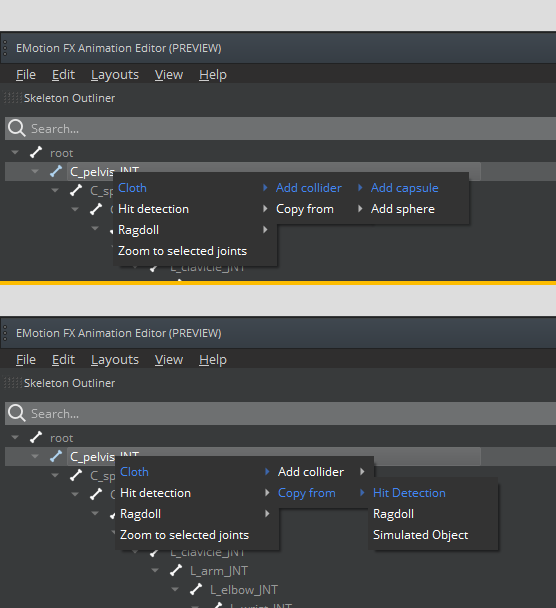
Right-click the selected joint, and then choose Cloth, Add collider. You can add colliders (capsules or spheres). You can also copy them from Hit Detection, Ragdolls or Simulated Objects.
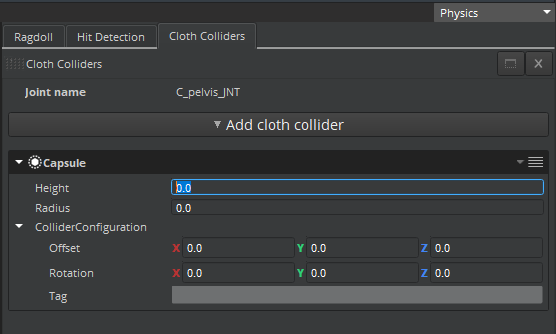
The Cloth Colliders tab shows you the list of cloth colliders of the selected joint.
Adjust the dimensions, offset, and rotation of cloth colliders.
- Choose File, Save Selected Actors.