
Open Particle System User Guide
The Open Particle System is the Open 3D Engine’s default particle simulation solution.
It features a full in-editor particle designer UI, as well as Components to trigger the emission of particles.
Basic Usage
Design your special effect using the built-in Particle Editor UI and save it as a Particle Asset.
Create a Particle component on an Entity in the world.
Assign your Particle Asset to the “Asset” field of the particle component.
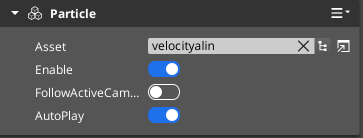
Set via the AutoPlay field in the component to play it automatically, or use the particle EBus messages to programatically start/stop the particle instance via C++, Script Canvas, or Lua.
| Topic | Description |
|---|---|
| Particle Editor | Working with the Particle Editor to create new Particle Assets |
| Particle Component | Using Particle Assets in the world on entities |