
Audio Controls Editor
Your game communicates all actions, events, and parameters to the audio system with Audio Translation Layer (ATL) controls. These ATL controls are mapped to one or more controls inside your selected middleware (such as Wwise). With the Audio Controls Editor, you can create controls and make connections between the ATL controls and the middleware controls.
To open the Audio Controls Editor
- In O3DE Editor, choose Tools, Other, Audio Controls Editor.
The Audio Controls Editor has three areas:
ATL Controls Pane - Hierarchical view of controls that exist in your project. The displayed icon designates the type of control.
Inspector Pane - Properties for the control selected in the ATL Controls pane.
Audio Engine Middleware Controls Pane - Controls created in the audio middleware authoring application.
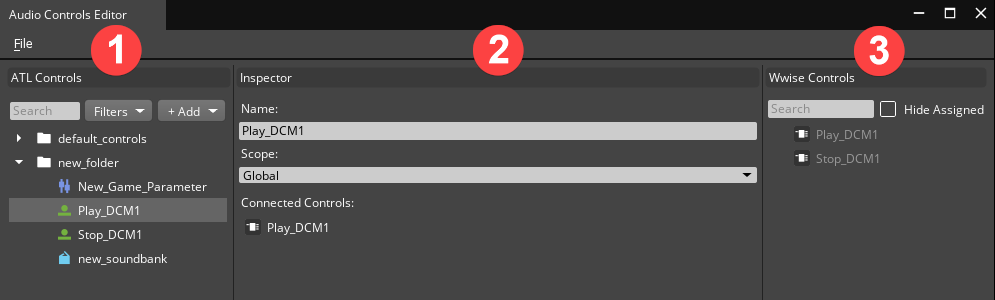
ATL Controls Pane
Use the Audio Controls Editor’s ATL Controls pane to add new audio controls and to select and edit audio controls in Open 3D Engine.
Inspector Pane
Use the Audio Controls Editor’s Inspector pane to edit the properties of the currently selected control in Open 3D Engine.
Audio Engine Middleware Controls Pane
Use the Audio Controls Editor’s audio engine middleware controls pane to filter and select a middleware-specific control to assign to an ATL control in Open 3D Engine.