
Using the UI Editor
You can use the UI Editor to create, customize, and animate various game user interface elements and components such as menus, buttons, and heads-up displays (HUDs).
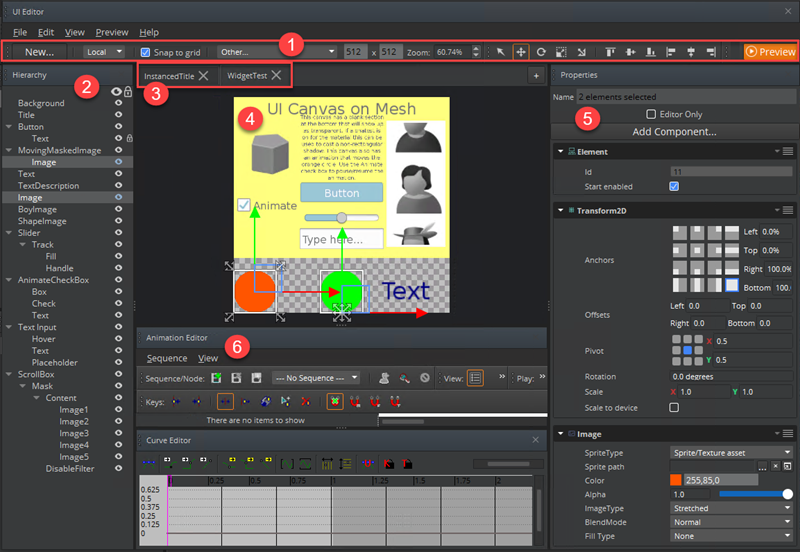
The UI Editor consists of the following:
Toolbar - Commonly used tools and settings
Hierarchy pane - List of UI elements that you create
UI canvas tab bar - Tabbed display of open canvases
Viewport - Display of the UI elements on the current UI canvas
Properties pane - Component properties for the selected element
Animation Editor - Tool for animating UI elements
Note:You can tear away and redock the Hierarchy pane, the Properties pane, the Animation Editor, and sections of the toolbar to customize the UI Editor.
To open the UI Editor
- In O3DE Editor, choose Tools and then UI Editor.
UI Editor Toolbar
Use the toolbar in Open 3D Engine’s UI Editor to manipulate your game UI elements.
Rulers and Guides
Use Rulers and Guides in Open 3D Engine’s UI Editor to visually guide the placement of game UI elements on your UI canvas.
Asset Drag and Drop
Drag and drop assets from the O3DE Editor’s Asset Browser into the UI Editor as a convenient way to create new entities and assets in the UI Editor.
Sprite Editor
Use the Sprite Editor to configure your images and textures in Open 3D Engine’s UI Editor .